

Description
Download Gear Fit Recorder APK – Audio Recording, Samsung Gear Fit, Free Android App, Multimedia Tool
Overview
Gear Fit Recorder is a free Android application developed by Tomo Labs, designed specifically for users of the Samsung Gear Fit 1. The app functions as a dedicated audio recording tool that enables users to capture sound directly through their smartphone’s microphone, with the recording process initiated and managed via the Gear Fit wearable device. This setup allows for hands-free audio capture, making it ideal for scenarios such as voice memos, on-the-go interviews, or ambient sound logging, where minimizing device interaction is essential.
Target users include individuals who rely on wearable technology for productivity and content creation, particularly those already invested in Samsung’s wearable ecosystem. The app is tailored to enhance the functionality of the Gear Fit 1 by extending its capabilities beyond fitness tracking. Real-world usage scenarios include recording meeting notes during commutes, capturing spontaneous ideas, or documenting field observations without the need to handle a smartphone.
As a multimedia utility, Gear Fit Recorder operates within the constraints of its intended hardware. The developer did not provide additional system requirements or background details beyond the app’s purpose and compatibility with the Gear Fit 1. It is important to note that the app is not compatible with other wearable devices or newer Gear Fit models, which limits its broader applicability.
Key Features & Capabilities
- Hands-Free Audio Recording – Initiate and stop recordings directly from the Gear Fit 1, eliminating the need to touch your smartphone during capture. This is particularly useful in dynamic environments where handling a phone is impractical.
- Smartphone Microphone Integration – Uses the connected smartphone’s microphone as the audio source, ensuring higher quality input compared to the wearable’s built-in mic.
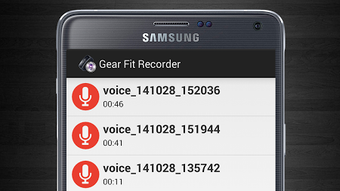
- Local File Management – Records audio files locally and provides a list view for playback and access, allowing users to review and manage their recordings directly from the device.
- Seamless Wearable Integration – Launches through App Connect on the Gear Fit 1, ensuring a streamlined user experience within the Samsung wearable interface.
- Compatibility with Gear Fit Manager – Requires installation of Gear Fit Manager on the smartphone to establish a stable connection between the wearable and the recording app.
These features collectively support efficient, low-effort audio capture in real-world situations. For example, a journalist conducting a street interview can start recording with a single tap on their watch, while keeping their phone in a pocket. Similarly, a student can capture lecture notes without disrupting the classroom environment. The app’s reliance on existing smartphone hardware ensures consistent audio quality while leveraging the convenience of wearable controls.
User Interface, Workflow & Performance
The user interface of Gear Fit Recorder is designed for minimalism and efficiency, aligning with the constraints of a wearable device. Navigation is straightforward, with the app accessible via the App Connect menu on the Gear Fit 1. Once launched, the interface presents a simple recording control panel, likely featuring a single button to start and stop recordings, with visual feedback such as a waveform or status indicator.
Workflow efficiency is optimized for quick access and immediate use. Users can begin recording with minimal steps after initial setup, making it suitable for spontaneous or time-sensitive recording needs. The app’s performance is expected to be stable under normal conditions, though exact performance details were not specified. The developer did not provide information on CPU or RAM usage, nor did they disclose any known stability issues.
Given its lightweight nature and operation through a connected smartphone, the app likely consumes minimal system resources. Performance observations are based on general software behavior patterns. The app does not require constant background processing, reducing battery drain on both the wearable and the paired smartphone.
Compatibility & System Requirements
Gear Fit Recorder is explicitly designed to work with the Samsung Gear Fit 1. It is not compatible with other Samsung wearable models or newer versions of the Gear Fit series. The app is available for Android devices and must be installed via the App Connect platform on the Gear Fit 1. The developer did not specify the minimum Android version or exact hardware requirements for the paired smartphone.
Installation size and file size details were not provided. Compatibility information was partially provided, with clear emphasis on the Gear Fit 1 as the sole supported device. The app relies on a stable Bluetooth connection between the wearable and the smartphone, which is managed through the Gear Fit Manager application. Without proper pairing and configuration, the app will not function.
Users should ensure their smartphone runs a compatible Android version and has Bluetooth enabled. The developer did not specify whether the app supports iOS devices or other operating systems. Platform compatibility information is limited to Android and the Gear Fit 1.
Pros and Cons
Pros
- Free to download and use with no in-app purchases
- Enables hands-free audio recording via wearable device
- Uses smartphone microphone for high-quality audio capture
- Simple, intuitive interface designed for wearables
- Efficient workflow with minimal setup after initial configuration
Cons
- Only compatible with Samsung Gear Fit 1, limiting broader usability
- Requires Gear Fit Manager to be installed on the smartphone
- No support for iOS or other wearable platforms
- File management is basic and lacks advanced editing features
- No cloud sync or export options mentioned
FAQ Section
Is Gear Fit Recorder compatible with Samsung Gear Fit 2 or later models?
Gear Fit Recorder is specifically designed for the Samsung Gear Fit 1. The developer did not provide information on compatibility with newer models, and the app is not known to function on Gear Fit 2 or subsequent versions.
Can I use Gear Fit Recorder without a smartphone?
No. The app requires a paired smartphone with Gear Fit Manager installed to function. It uses the smartphone’s microphone and processing power, so standalone operation on the Gear Fit 1 is not possible.
Is the app safe to download and install?
Gear Fit Recorder is a free application developed by Tomo Labs and distributed through the App Connect platform on the Gear Fit 1. It does not require root access or unusual permissions. However, users should ensure they download the app only from official sources to maintain security.
Does the app support automatic updates?
Updates are managed through the App Connect platform on the Gear Fit 1. The developer did not specify whether automatic update checks are enabled or if manual updates are required.
Can I export or share recorded files?
The app allows users to view and play recorded files locally. However, the developer did not provide information on export options, sharing features, or integration with cloud storage services.
Final Thoughts + CTA
Gear Fit Recorder delivers a focused and functional solution for users of the Samsung Gear Fit 1 who need a convenient way to record audio without handling their smartphone. Its hands-free operation, seamless integration with the wearable, and reliance on the smartphone’s microphone make it a practical tool for on-the-go recording. While its compatibility is limited to a single device model and lacks advanced features like file sharing or editing, it excels in simplicity and purpose.
For professionals and casual users within the Samsung wearable ecosystem, especially those seeking a lightweight audio tool, this app offers real value. It is particularly well-suited for quick voice memos, interviews, or ambient sound capture. The fact that it is free and easy to install enhances its appeal.
Download Gear Fit Recorder now
Guides & Tutorials for Gear Fit Recorder APK
How to install Gear Fit Recorder APK
- Click the Preview / Download button above.
- Once redirected, accept the terms and click Install.
- Wait for the Gear Fit Recorder APK download to finish on your device.
How to use Gear Fit Recorder APK
This software is primarily used for its core features described above. Open the app after installation to explore its capabilities.
User Reviews for Gear Fit Recorder APK 0
No reviews found





